ARCH
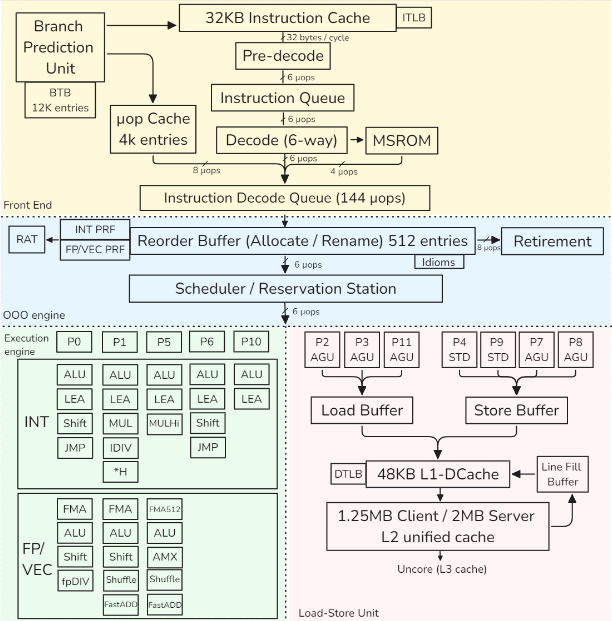
this is a representation of the Golden Cove intel architecture
Dynamic Frequency Scaling (DFS)
Also called Turbo mode.
Allows the CPU to temporarily increase its frequency above the base clock to boost performance.
This can distort benchmarks, since the CPU does not run at a constant frequency, reducing result consistency and accuracy.
Architecture models (high level)
1) Register-based, load–store architectures
- Arithmetic ops use registers only
- Memory accessed only via explicit load/store
- Easy pipelining, OoO-friendly, compiler-friendly
- Most modern ISAs
Examples: ARM, RISC-V
2) Register-based, register–memory architectures
- Arithmetic ops may use register + memory operand
- ISA is not load–store, but microarchitecture behaves like one
- Legacy-friendly, complex decoding
Example: x86
Small remark: Stack-based architectures
- Operands implicit on a stack
- Compact encoding, poor for pipelining
- Common in VMs, not modern CPUs
Examples: JVM, WebAssembly
Pipeline
detail cpu pipeline here
PIPELINE Example
add rax, [rbx+8]1. Frontend — What instruction to run?
- BPU predicts next PC
- L1 I-cache fetches instruction bytes
- Pre-decode finds instruction boundary
- Decode → 2 µops:
- µop 1: load
[rbx+8] - µop 2: add →
rax
- µop 1: load
- µop cache may bypass decode entirely
- µops enter IDQ
2. Rename / Allocate — Prepare execution
- ROB allocates entries
- RAT maps:
rax→ physical registerP42
- Dependencies tracked
- µops enter Scheduler (RS)
3. Execute — Do work when ready
Load µop
- AGU computes
rbx + 8(virtual address) - DTLB translates VA → PA
- L1 D-cache lookup
- If hit → value ready
Add µop
- Waits for load result
- Dispatched to INT ALU port
- Computes addition
4. Memory system — Handle misses if needed
- If L1 miss:
- L2 → L3 → RAM
- Fill Buffer tracks request
- Load resumes when data arrives
5. Retire — Make it architecturally visible
- µops complete out of order
- ROB retires in order
raxupdated- Instruction committed
6. What each block did (one line each)
- BPU: guessed next instruction
- Frontend: turned bytes → µops
- ROB / RAT: renamed + tracked speculation
- Scheduler: waited for operands
- AGU: computed address
- TLB: translated address
- Cache: supplied data
- ALU: computed result
- ROB retire: committed state
Pipeline Hazards (Reminder)
- Break ideal pipelining → stalls
- Affect throughput / effective frequency
- Fully handled by hardware
Structural
- Resource conflict (same unit, same cycle)
- Mitigation: more hardware (ALUs, ports)
Data
- RAW: true dependency → forwarding
- WAR: false dependency → register renaming
- WAW: false dependency → register renaming
Control
- Branches / flow changes
- Mitigation: branch prediction, speculation
A superscalar engine
executes multiple independent instructions per cycle by issuing them to several execution units in parallel.
Branch Prediction
- Correct prediction → high throughput
- Misprediction → expensive pipeline flush
- Uses dynamic, adaptive predictors
Branch Types
- Unconditional / direct
- Always taken
- Single target
- Easy to predict
- Conditional
- Taken / not taken
- Forward (if/else): often not taken
- Backward (loops): often taken
- Indirect
- Multiple targets
- From switch, function pointers, virtual calls
- Returns are also indirect
CACHE
Cache is address-based
- Cache does not store variables
- Stores data indexed by physical addresses
- Any access is:
- Address → set → tag match → hit/miss
- cache line (usually 64B, Apple M chips: 128B)
Address generation
- Address Generation Unit (AGU):
- base register + offset
- Result = virtual address
Addresses used by programs
- Load / store instructions issue virtual addresses (VA)
- All address generation happens in load–store units
- Other execution units do not see addresses
Cache access
- Cache stores physical memory only
- Cache lines are physically tagged
- Allows cache indexing and address translation to proceed in parallel (L1)
- L2 / L3 caches require translation before lookup
TLB (Translation Lookaside Buffer)
Purpose
- Cache recent virtual → physical translations
- Avoid expensive page-table walks
TLB hierarchy
- L1 iTLB: instruction fetch
- L1 dTLB: data access
- L2 TLB (STLB): shared, larger, slower
What TLB stores
- Virtual Page Number (VPN)
- Physical Page Number (PPN)
- Permission bits:
- read / write / execute
- user / kernel
- State bits (valid, global, etc.)
TLB miss handling
- L1 TLB miss → check L2 TLB
- L2 TLB miss → hardware page-table walker
- Page walker:
- reads page tables from memory
- uses cache hierarchy
- Mapping exists → TLB filled, load/store retried
- Mapping does not exist → page fault
Page fault
- Page table entry not present
- CPU raises page fault exception
- OS handles:
- allocate page or
- load page from disk
- Instruction is restarted
Link between TLB and Cache
- TLB: translates virtual addresses → physical addresses (validity, permissions)
- Cache: uses physical addresses → returns data quickly
TLB lookup and L1 cache indexing can proceed in parallel
Important rules
- TLB miss ≠ cache miss
- TLB miss ≠ page fault
- TLB miss cost > cache miss cost
TESTING
CI Perfomoramce
- Set up the system under test
- Run benchmark suite
- Collect and report results
- Detect performance changes
- Alert on unexpected regressions or gains
- Visualize results for human analysis
CI Threshold
Performance tests in CI must define explicit acceptable variation thresholds.
Unexpected performance gains in unrelated code paths often indicate measurement errors or regressions, not better code.
LUCI
performance test suite of the chromium project
Manual Testing
- Always compare baseline vs modified
- Never trust single-run results
- Run benchmarks multiple times
- Treat results as a distribution
- Check standard deviation first
- High variance → results unreliable
- Do not compute speedups on noisy data
- Unexpected speedups often mean measurement error
- Use visualization to validate results
- Outliers matter — don’t discard blindly
- Prefer median / percentiles if data is skewed
- Reduce noise before increasing sample count
- More samples ≠ better results if variance remains high
Timer
- Long-running tests: use standard library time functions
- Based on system (wall-clock) time
- Short / precise tests: use CPU cycle counters
- x86:
RDTSC/RDTSCPinstruction - ARM: architectural timer sts: use CPU cycle counters
- x86:
X86 Time Reg
RDTSC— Read Time-Stamp Counter- Reads the TSC (Time Stamp Counter)
- Counts cycles since reset
RDTSCP— Serializing variant ofRDTSC- Ensures better ordering for measurements
Notes
- Modern CPUs use invariant TSC
- TSC frequency is constant (independent of DFS / Turbo)
- Still affected by out-of-order execution → use serialization if needed
ARM Time Reg
CNTVCT_EL0— Virtual Count Register (most commonly used in user space)CNTPCT_EL0— Physical Count Register (more privileged)
Both count cycles of the architectural timer, not core frequency.
Typical choice:
- User-space timing →
CNTVCT_EL0 - Kernel / low-level timing →
CNTPCT_EL0
(They are the ARM equivalent of x86 RDTSC, but with a fixed-frequency timer.)
Terminology and Metrics
retired vs executed instr
- executed → that is executed by the cpu
- retired → that is executed and in the speculation is right
if an instruction is executed but the branch end up not taken all the result get flush
CPU Utilization
The percentage of time a core is not idle.
- Formula:
Ref Cycles (Unhalted) / Total TSC Cycles=- Ref Cycle → how many reference clock cycles happened while the CPU core was awake and not idle
- TSC → Timestamp Counter (always ticking)
- The Trap: High utilization != High performance. A CPU can be 100% “utilized” while completely stalled waiting for memory or spinning on a lock.
IPC and CPI
Metrics for microarchitectural efficiency.
1. IPC (Instructions Per Cycle) ← most use for perf
- Definition: How many instructions retired per clock cycle
- Goal: Higher is better
- Compute-heavy: 4–6
- Memory-heavy: 0–1
- Formula:
Instructions Retired / Cycles (Unhalted)
2. CPI (Cycles Per Instruction)
- Definition: How many cycles to retire one instruction
1/IPC - Goal: Lower is better
The Performance Equation
Performance = IPC × Frequency
Frequency vs. IPC
- Independence:
- IPC and Frequency are independent metrics in benchmarking.
- Clock Speed:
- Frequency only defines how fast a cycle is
- IPC defines how much work happens inside that cycle.
- The Reality:
- Running a CPU at 1 GHz vs. 5 GHz usually results in the same IPC
- To increase IPC: Improve the design (larger caches, better branch prediction, Out-of-Order execution).
- Design Trade-off:
- Intel/AMD often push High Frequency
- Apple M-series pushes High IPC (which allows for lower frequency and better power efficiency).
Micro-operation (µop)
x86 architecture is:
- Outside (ASM): CISC (Complex Instruction Set Computer)
- Inside (Hardware): RISC-style (Reduced Instruction Set Computer)
x86 CISC instructions are split into RISC-style µops to:
- OOO :
push rbxsplit into:sub rsp, 8store [rps], rbx
- Execute in parallel: Complex instructions are broken into independent parts.
- Example:
HADDPD xmm1, xmm2(Horizontal Add) splits into:- Reduce
xmm2→tmp1 - Reduce
xmm1→tmp2 - Merge results into
xmm1
- Reduce
- Steps 1 and 2 are independent and can run simultaneously.
- Example:
- Simplify the Execution Pipeline: The backend only needs to handle simple, uniform operations rather than hundreds of complex legacy instructions.
Microfusion
if a instruction is :
- memory write
- read-modify you can be fuse into 1 µop (ex : `add eax [mem])
Macrofusion
use μops from different machine instructions. Applies to: Typically an arithmetic/logic instruction followed by a conditional jump.
Example :
dec rdi
jnz .loop
Modern updates: Zen 4 now supports macro-fusion for
DIVandNOPsequences.
Pipeline Slot
A pipeline slot represents the hardware resources required to process a single µop.
- Definition: It is the unit of “work capacity” for a CPU cycle.
- Allocation Width in µops:
- Skylake, Zen 3: 4 wide
- Golden Cove / Zen 4: 6-wide
- Apple M3: 9-wide
- The IPC Cap: A machine’s width is its theoretical maximum IPC. If you measure an IPC of 7 on a 6-wide Golden Cove, your measurements are likely wrong.
Core vs. Reference Cycles
Because of Turbo Boost (DFS), “one cycle” has a variable duration.
- Core Cycles (
cycles): Actual pulses at the current frequency.- Best for: Measuring code complexity/efficiency.
- Ref Cycles (
ref-cycles): Pulses at the fixed base frequency.- Best for: Measuring time relative to the official clock speed.
- Key Rule: IPC and Frequency are independent. * Changing frequency (1GHz → 5GHz) doesn’t change IPC.
- IPC is improved by design (bigger caches, better predictors).
Cache Miss
Occurs when the CPU looks for data in a cache and it isn’t there.
- L1 Cache → 4 cycles (~1 ns)
- L2 Cache → 10-25 cycles (5-10 ns)
- L3 Cache → ~40 cycles (20 ns)
- Main Memory → 200+ cycles (100 ns)
Mispredicted branch
ispredicted branch typically involves a penalty between 10 and 25 clock cycles.
- all instr exec need to be flush
- some buffers may require cleanup to restore the state
Memory Latency and Bandwidth
- Latency (how fast to get 1 byte)
- Bandwidth (how many bytes per second).
Measuring Performance
- Latency: Measured by pointer chasing (sequential, dependent loads).
- Bandwidth: Measured by independent loads (often using SIMD/AVX2) to saturate the data bus.
- Tools: Intel MLC (Memory Latency Checker) for x86;
lmbenchorSTREAMfor ARM/Generic.
Hierarchy Metrics (Example: Alder Lake)
| Level | Size (P-core) | Latency | Max Bandwidth (All Cores) |
|---|---|---|---|
| L1 D-Cache | 48 KB | ~1.1 ns | ~TB/s scale |
| L2 Cache | 1.25 MB | ~3.2 ns | ~175 GB/s |
| L3 (Shared) | 18 MB | ~12.5 ns | ~300 GB/s |
| DDR4 RAM | 16 GB | ~45–90 ns | ~33.7 GB/s |
Idle vs. Loaded
- Idle Latency: Travel time on an empty highway; data arrives at the absolute maximum hardware speed.
- Loaded Latency: Travel time during rush hour; data is delayed because it must wait in line (queue) behind other requests.
Case Study: Analyzing Performance Metrics of Four Benchmarks
To collect performance metrics, I used the toplev.py script from Andi Kleen’s pmu-tools
| Metric Name | Core Type | Blender | Stockfish | Clang 15 | CloverLeaf |
|---|---|---|---|---|---|
| Instructions | P-core | 6.02E+12 | 6.59E+11 | 2.40E+13 | 1.06E+12 |
| Core Cycles | P-core | 4.31E+12 | 3.65E+11 | 3.78E+13 | 5.25E+12 |
| IPC | P-core | 1.40 | 1.80 | 0.64 | 0.20 |
| CPI | P-core | 0.72 | 0.55 | 1.57 | 4.96 |
| Instructions | E-core | 4.97E+12 | 0 | 1.43E+13 | 1.11E+12 |
| Core Cycles | E-core | 3.73E+12 | 0 | 3.19E+13 | 4.28E+12 |
| IPC | E-core | 1.33 | 0 | 0.45 | 0.26 |
| L1MPKI | P-core | 3.88 | 21.38 | 6.01 | 13.44 |
| L2MPKI | P-core | 0.15 | 1.67 | 1.09 | 3.58 |
| L3MPKI | P-core | 0.04 | 0.14 | 0.56 | 3.43 |
| Br. Misp. Ratio | P-core | 0.02 | 0.08 | 0.03 | 0.01 |
| Code STLB MPKI | P-core | 0 | 0.01 | 0.35 | 0.01 |
| Ld STLB MPKI | P-core | 0.08 | 0.04 | 0.51 | 0.03 |
| LdMissLat (Clk) | P-core | 12.92 | 10.37 | 76.7 | 253.89 |
| ILP | P-core | 3.67 | 3.65 | 2.93 | 2.53 |
| MLP | P-core | 1.61 | 2.62 | 1.57 | 2.78 |
| Dram Bw (GB/s) | All | 1.58 | 1.42 | 10.67 | 24.57 |
| IpCall | All | 176.8 | 153.5 | 40.9 | 2,729 |
| IpMispredict | All | 610.4 | 214.7 | 177.7 | 2,416 |
| IpFLOP | All | 1.1 | 1.82E+06 | 286,348 | 1.8 |
| IpSWPF | All | 90.2 | 2,565 | 105,933 | 172,348 |
1. The “Big Picture” Efficiency
- IPC (Instructions Per Cycle): * High (> 1.5): Likely Compute-Bound (Blender, Stockfish).
- Low (< 1.0): Likely Memory or Latency-Bound (Clang, CloverLeaf).
- Core Distribution: Check if work is balanced between P-cores and E-cores (Blender/CloverLeaf) or if the app is pinned to a single thread (Stockfish)
2. Compute & Instruction Mix
- IpFLOP / IpArith: Are you doing math?
- If high, check IpArith AVX128/256: Is the code vectorized? (Blender/CloverLeaf).
- If zero, you are likely doing Integer logic or Pointer Chasing (Stockfish/Clang).
- IpSWPF (Software Prefetches): Look for these to see if the compiler or programmer is manually “helping” the memory controller.
3. Branching & Control Flow
- Br. Misp. Ratio: Anything over 2-5% is a major red flag (Stockfish/Clang).
- IpMispredict: How many instructions pass between “surprises” for the CPU?
- IpCall: Are functions too small? If this is low (~40), the CPU spends more time handling function “overhead” (stack setup/cleanup) than doing real work (Clang).
4. Memory Hierarchy & TLB
- L*MPKI (Misses Per Kilo-Instruction):
- High L1/L2 MPKI: Code doesn’t fit in local cache.
- High L3 MPKI: Code is streaming from RAM (CloverLeaf).
- LdMissLat (Load Miss Latency): This is the “pain metric.”
- Low (~12 cycles): Hits are mostly in L3.
- High (>200 cycles): Hits are coming from RAM; CPU is starving (CloverLeaf).
- STLB MPKI (TLB Misses): Does the binary have a huge footprint? High values here mean the CPU is “lost” trying to find where code or data lives in memory (Clang).
5. System Limits
- DRAM Bandwidth: Compare your measured GB/s against your RAM’s theoretical max.
- If you are near the limit (~70-80%+), adding more threads will actually slow down the program due to contention (CloverLeaf).
Analysis Approches
Code Instrumentation
adding additional code or tools to your application to collect data about its performance, behavior, and usage
#include <stdio.h>
#include <time.h>

void complex_algorithm() {
    clock_t start = clock(); // Instrumentation: Start point

    // ... actual application logic ...

    clock_t end = clock();   // Instrumentation: End point
    double cpu_time = ((double) (end - start)) / CLOCKS_PER_SEC;

    printf("Metric - Execution Time: %f seconds\n", cpu_time);
}
Binary Instrumentation
modifies the compiled executable itself. You don’t need the original source code; you inject “analysis code” directly into the machine instructions.
How it Works
Intercepts program execution at specific events to generate new instrumented code, allowing runtime data collection.
Key Tools:
- Intel Pin (highly popular)
- Intel SDE (Software Development Emulator, built on Pin)
- DynamoRIO
What it Collects:
- Instruction mix analysis
- Intercepted function calls and specific instructions
- Memory intensity and footprint
Limitations:
It only instruments user-level code and can cause the program to run very slowly.
Tracing
The process of recording a detailed, chronological log of specific events that occur while a program is executing.
example : strace
Performance Monitoring Counters (PMCs)
-
Definition: Dedicated hardware registers inside the CPU that can be programmed to track specific low-level hardware events (e.g., cache misses, branch mispredictions, or instructions executed).
-
Hardware Limitation: CPUs only have a limited, fixed number of physical PMCs available to use at any given time (typically around 12, depending on the architecture).
-
Multiplexing: If you need to track more events than there are physical PMCs available, profiling tools use a technique called multiplexing.
-
How Multiplexing Works: The tool rapidly rotates (time-shares) the available physical counters across all the requested events, estimating the total count for each event based on the time it was actively monitored.
Marker API
Marker APIs Analyze specific, targeted code regions (not the whole app). Useful for isolating performance bugs in loops, functions, or specific RPCs. Examples:
- Intel VTune:
__itt_task_begin/__itt_task_end - AMD uProf:
amdProfileResume/amdProfilePause - libpfm4 (Linux): wrapper library around the low-level
perf_eventssubsystem.
libpfm4 example:
// Conceptual example of libpfm4 usage
pfm_initialize();
// ... setup perf_event_attr and get event encodings ...
int event_fd = perf_event_open(&perf_attr, 0, -1, leader_fd, 0);

read(event_fd, &before, sizeof(struct read_format));

complex_algorithm(); // The specific code being measured

read(event_fd, &after, sizeof(struct read_format));

// Delta gives exact hardware metrics for that function
uint64_t cycles_used = after.values[1] - before.values[1];
Instrumentation Overhead
Actively measuring code costs CPU time :
- Local testing:
~15-20%overhead is usually acceptable. - Production: Target <
1%to5%maximum overhead.
fix cost
Ensure instrumentation relies on constant, deterministic operations (e.g., a fixed syscall) rather than variable-cost actions like dynamic memory allocation or list traversals that skew your measurements.
Sampling
Use Sampling (only measure a fraction of events) and Online Algorithms (compute math like averages on-the-fly) so you don’t waste CPU cycles or memory storing data.
Group Events for Atomic Reads
Group related events to read them atomically at the exact same time, preventing “phase bias” and ensuring accurate ratios for compound metrics like IPC.
Always Check for Multiplexing
Since hardware counters are limited, always check if time_running < time_enabled to detect if the CPU is multiplexing (time-sharing) your events and estimating the counts.